LearningSkol
My Decks
Flashcard Editor
Cards in this deck (3)

Free Online Flashcard Maker for Students
The learningSkol Flashcard Tool is a free, browser-based flashcard maker designed specifically for students. Whether you are preparing for a biology exam, memorising historical dates, building vocabulary in a foreign language, or drilling through math formulas, our digital flashcard creator gives you everything you need to learn faster and remember longer. Create unlimited decks, add as many cards as you like, and launch a study session in seconds — all without downloading any app or creating an account.
Unlike physical index cards that get lost or worn out, digital flashcards are always with you. Our online flashcard tool auto-saves all your decks directly to your browser so your progress is never lost. Switch between subjects effortlessly using the My Decks sidebar and jump straight into a focused study session with a single click.
What is a Flashcard and Why Does It Work?
A flashcard is a simple learning aid consisting of two sides — a question or term on the front, and the answer or definition on the back. The power of flashcards lies in active recall: instead of passively reading notes, you force your brain to retrieve information from memory. Research in cognitive psychology consistently shows that active recall is one of the most effective study strategies available, significantly outperforming re-reading, highlighting, and summarising.
When you flip a card and try to remember the answer before seeing it, you strengthen the neural pathways associated with that piece of information. Each successful retrieval makes the memory more durable and easier to access in the future. This is why flashcards have remained a cornerstone of effective studying for centuries — from medical students memorising anatomy to language learners practising vocabulary.
Spaced Repetition: The Science Behind Our Flashcard System
Our flashcard tool goes beyond simple random review by implementing a spaced repetition system (SRS). Spaced repetition is based on the forgetting curve, first described by psychologist Hermann Ebbinghaus in the 1880s. The forgetting curve shows that we forget information rapidly after first learning it — but each time we successfully review and recall that information, the rate of forgetting slows down dramatically.
The key insight of spaced repetition is this: you should review information just before you are about to forget it. Reviewing too early wastes time; reviewing too late means the memory has already degraded. By spacing reviews at optimal intervals, you achieve maximum retention with minimum study time.
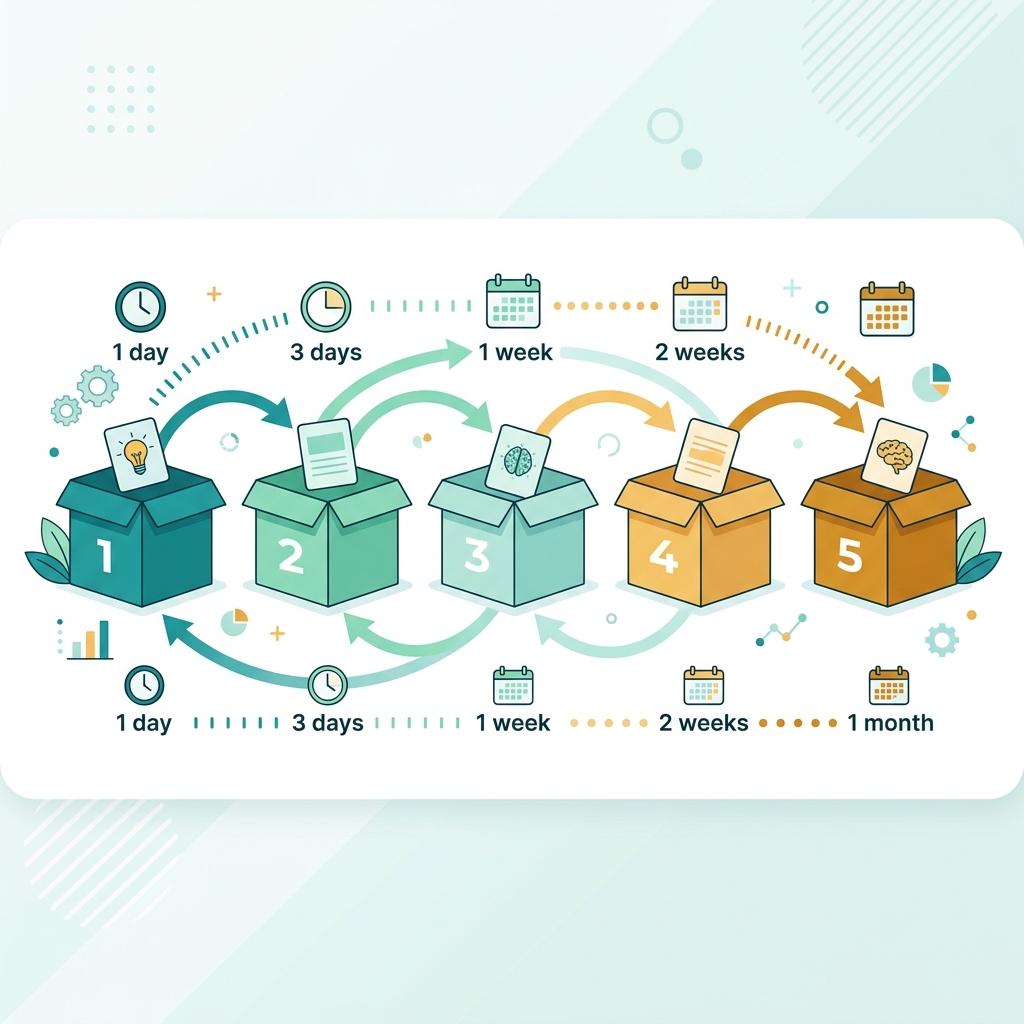
How Our Box System Works
We use a simplified version of the Leitner Box System, which divides your flashcards into six boxes (numbered 1–6) based on how well you know each card:
- Box 1 — Review after 1 day (brand new or forgotten cards)
- Box 2 — Review after 2 days
- Box 3 — Review after 4 days
- Box 4 — Review after 1 week
- Box 5 — Review after 2 weeks
- Box 6 — Review after 1 month (mastered cards)
When you rate a card as Easy, it moves to the next box and will not be shown again until the corresponding interval has passed. When you rate it as Hard, it resets back to Box 1 for immediate re-review. Over time, cards you know well naturally drift to higher boxes and take up less of your study time, while difficult cards keep appearing frequently until you master them.
How to Use the Flashcard Tool
Step 1 — Create a Deck
Click New Deck in the left sidebar. Give your deck a descriptive name (e.g., "Organic Chemistry Chapter 5"), choose an emoji icon that represents the subject, and pick a colour theme. Your deck will appear instantly in the sidebar, ready to receive cards.
Step 2 — Add Cards
With your deck selected, the Flashcard Editor panel appears on the right. Type your question or term in the Front of Card field (the teal panel) and type the answer or definition in the Back of Card field (the amber panel). Click Add Card to save. Repeat for as many cards as you need — there is no limit.
Keep card content focused and concise. The best flashcards test a single fact or concept per card. If you find yourself writing multiple sentences on a card, consider splitting it into two separate cards. This keeps each piece of information atomic and easier to retrieve.
Step 3 — Study Your Deck
Click the Study button to launch study mode. Cards are presented in randomised order. Read the front, try to recall the answer, then tap the card to flip it and reveal the back. Rate your performance honestly: Easy if you recalled it confidently, Hard if you struggled or got it wrong.
Step 4 — Track Progress
Each card displays its current box level (1–6) in the deck view. You can see at a glance which cards are mastered (high box number) and which need more attention (low box number). The progress bar in study mode shows how far through the current session you are.
Tips for Making Effective Flashcards
Use Simple, Direct Language
Write card fronts as clear questions and card backs as precise, minimal answers. Avoid copying long textbook passages. Compress information to its essence — if you can say it in 10 words instead of 30, do it.
One Fact Per Card (the Minimum Information Principle)
Each flashcard should test exactly one piece of knowledge. This is called the minimum information principle, coined by Piotr Wozniak, creator of the SuperMemo spaced repetition software. Complex cards take longer to review, are harder to recall, and provide confusing feedback — did you fail because you forgot part A or part B?
Use Images and Context
Where possible, include context on your cards. Instead of "What is glucose?" write "In cellular respiration, what molecule serves as the primary energy substrate?" Context makes recall more reliable and helps you avoid the illusion of knowing a fact out of context.
Review Every Day
The magic of spaced repetition only works if you show up consistently. Even 10–15 minutes of daily flashcard review compounds into enormous knowledge retention over weeks and months. Set a daily reminder and treat your flashcard session like a non-negotiable part of your study routine.
Don't Cram
Resist the temptation to do massive marathon sessions the night before an exam. Spaced repetition requires time between sessions for memories to consolidate. Start your flashcard decks at least 2–3 weeks before any major exam so the system has time to work properly.
Best Subjects for Flashcard Learning
Flashcards work exceptionally well for any subject requiring memorisation of discrete facts, definitions, or associations:
- Languages — vocabulary, verb conjugations, grammar rules, pronunciation guides
- Medicine & Biology — anatomical terms, drug names, disease symptoms, biological processes
- History — dates, events, key figures, causes and effects
- Chemistry — element symbols, compound names, reaction equations, functional groups
- Mathematics — formulas, theorems, definitions, problem-solving procedures
- Law — legal definitions, case names, statutes, procedural rules
- Geography — capitals, countries, physical features, demographic data
- Computer Science — programming syntax, algorithm complexity, data structure properties
Digital Flashcards vs. Physical Cards
Physical index cards have served students well for generations, but digital flashcard tools offer significant advantages:
- Always accessible — study on any device with a browser, no cards to carry
- Automatic shuffling — no need to manually randomise your deck
- Spaced repetition scheduling — the system tracks which cards to review, not you
- Instant editing — fix a typo or update an answer in seconds
- No physical limits — create thousands of cards without running out of space
- Progress tracking — see exactly which cards you know and which need work
Frequently Asked Questions
Are my flashcards saved automatically?
Yes. All your decks and cards are automatically saved to your browser's localStorage. As long as you use the same browser and don't clear your browser data, your flashcards will persist between sessions. We recommend occasionally noting down important decks in case you switch browsers or devices.
How many cards should a deck have?
There is no strict rule, but decks of 20–80 cards work well for most subjects. Smaller decks can be studied in a single focused session; larger decks benefit from splitting into sub-topics. For example, instead of one giant "Chemistry" deck, create separate decks for "Organic Chemistry", "Electrochemistry", and "Thermodynamics".
Can I study the same card multiple times in one session?
In study mode, each card is shown once per session. After rating all cards, you can click Study Again to restart the session with a fresh shuffle. The spaced repetition box levels update after each session so the next time you study, cards will appear according to their scheduled intervals.
What does the box number on each card mean?
The box number (1–6) indicates how well you know a card. Box 1 cards are new or frequently forgotten; Box 6 cards are well-mastered and reviewed only monthly. The goal is to gradually move all cards to Box 5 or 6 by consistently rating them as Easy.
Is this flashcard tool completely free?
Yes, entirely free with no registration required. The learningSkol is built for students who need powerful study tools without paywalls or subscriptions.
Can I use this for exam preparation?
Absolutely. Flashcards combined with spaced repetition are among the most evidence-backed study methods for exam preparation. Start building your decks 3–4 weeks before your exam date, study daily, and the spaced repetition system will ensure you review each piece of information at the optimal interval for long-term retention.
The Learning Science Behind Flashcards
Several decades of cognitive science research support the use of flashcards and spaced repetition as superior study strategies:
- The Testing Effect — retrieving information from memory strengthens it more than re-reading the same information (Roediger & Karpicke, 2006).
- Spaced Practice — distributing study sessions over time produces better long-term retention than massed practice (cramming), even when total study time is the same (Cepeda et al., 2006).
- Interleaving — mixing different topics within a study session improves the ability to discriminate between concepts and apply knowledge flexibly.
- Elaborative Interrogation — writing "why" or "how" questions on card fronts promotes deeper processing and better retention than simple definition cards.
By combining active recall (flipping cards) with spaced repetition (the box system), our flashcard tool puts two of the most powerful learning strategies to work for you simultaneously.
Start Building Your Flashcard Decks Today
Whether you are a high school student preparing for your first major exams, a university student tackling advanced coursework, or a professional learning new skills, the learningSkol Flashcard Tool is designed to help you learn more efficiently. Create your first deck now — it takes less than a minute — and experience the difference that evidence-based study techniques can make to your academic performance.
Combine the Flashcard Tool with our other free study tools: the Pomodoro Timer for focused study sessions, the Study Planner for organising your schedule, and the GPA Calculator to track your academic progress. Everything you need for academic success, in one free platform.